 ChatAd
How to Track ChatGPT Ads Conversions
 Alex MakonFounder of ChatAd
On this page
Tag the visit and record the completed action
URL tags identify visits from a campaign in your analytics tool. A conversion event records an action, such as a completed purchase or submitted enquiry. Decide which completed action the campaign should measure. A button click can help you find where people drop out, but the click alone does not confirm an order or a lead.
Use consistent utm_source, utm_medium and utm_campaign values across your destination URLs. Open a tagged link and check that it lands on the right page and keeps the tags after any redirect. Then check that the visit appears under the intended campaign in your analytics tool. OpenAI’s reporting guide
Send the event to the right data source
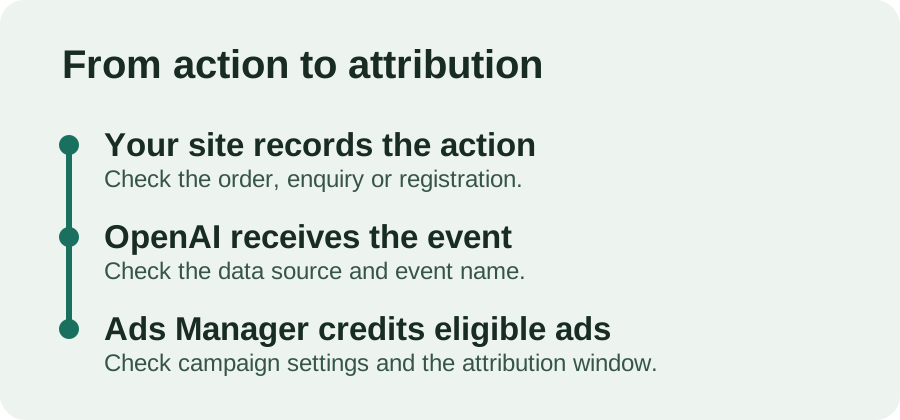
Create a data source in Ads Manager. The OpenAI Pixel sends events from the browser. The Conversions API sends them from your server. Use the method your team can maintain and check that it respects visitors’ consent choices. If both methods send the same completed action, match the Pixel ID, event name and event ID so OpenAI can count it once.
OpenAI can append its own click reference, oppref, to the landing-page URL. Preserve it through redirects and include it in server events when available. It helps OpenAI match the action to an ad. Your UTM tags serve a separate purpose: labeling campaign traffic in analytics. OpenAI conversion measurement · Event troubleshooting and deduplication
Test 1 completed action before launch
- Open the destination with campaign tags and confirm the page and analytics labels.
- Complete the action and look for the actual order, enquiry or registration in your records.
- Check that the intended OpenAI data source received the event. Write down the event name, ID and time so you can trace it.
- Confirm that the campaign is configured for that event. When you use a custom event, the event type and name must match exactly.
If your Web Pixel has a Test option, open it through Conversions → Data Sources and the Pixel’s menu. Start a test session, complete the action and check the Event Stream. The option may vary by data source. OpenAI’s Pixel testing instructions
An event can arrive in Ads Manager without being credited to an ad. After launch, check attributed conversions separately. OpenAI says they can take 24–48 hours to appear. If the event never reached the data source, investigate the setup rather than waiting for the report to refresh. OpenAI’s troubleshooting guide
Compare reports on the same basis
Your CRM counts the actions it records. Ads Manager counts the actions it credits to ads. Compare the same event, date range, time zone and attribution settings before treating a difference as an error. If a report includes view-through conversions, check whether your comparison does too. How OpenAI explains reporting differences