 ChatAd
How to advertise on ChatGPT: from eligibility to first campaign
 Alex MakonFounder of ChatAd

On this page
Your team has agreed to test ChatGPT Ads. Someone opens Ads Manager, enters the website and starts filling in fields. Ten minutes later, the questions arrive: Which country should this account use? What counts as a conversion? Can we publish now and set the launch date afterwards?
Those decisions belong in the brief, before anyone approves a campaign. A useful first launch connects one customer need, a relevant destination and a measurable next step. The account setup is how you put that plan into the platform.
Here is the route from “we should try this” to a campaign you can check.
1. Check three kinds of eligibility
Start with the legal entity that will advertise and pay the bill. OpenAI’s current self-service availability list includes the United States, United Kingdom, Canada and Australia, among other countries. The entity must be based in an eligible country. An account can be created even when self-service access is unavailable; registration does not establish launch eligibility. Ads Manager availability
Then check the actual offer. Approval is about the product, claims and destination, not just whether your business has a website. OpenAI restricts or prohibits categories and reviews creative and landing pages. Regulated categories can have additional, market-specific conditions; do not interpret a competitor’s active ad as permission for your offer. Ad policies
Finally, check where this particular account can deliver. Some new self-service accounts initially have home-country restrictions. Selecting another country does not remove them. Campaign location rules
| Check | Evidence to have before continuing |
|---|---|
| Advertiser eligibility | Correct legal entity and an eligible country |
| Offer eligibility | Ad, image and destination checked against current policies |
| Delivery eligibility | An allowed campaign location that fits the business |
If one fails, resolve it before producing a large creative batch. A technically complete campaign can still be commercially unusable for your intended market.
2. Set up the account you intend to keep
Go directly to ads.openai.com. If your company already has an advertiser account, ask its administrator for an invitation instead of creating a duplicate. One person can set up the account and invite the team.
OpenAI describes two onboarding paths: start with your website and prepare an ad during signup, or skip that step and create the campaign inside Ads Manager later. Review account details carefully: country or region, currency and time zone cannot be changed after account creation. Billing and required account reviews must be completed before delivery. Account setup
Review the names too. Your internal account name, public brand name and registered legal name serve different purposes. A trading name on an ad should not accidentally become the wrong company name on billing records.
Our practical suggestion is to name an internal owner before setup: who approves the spend, who manages the campaign, and who can resolve billing or verification questions? These can be different people. Writing them down prevents a launch from depending on a password shared in a group chat.
3. Turn the brief into a campaign structure
Ads Manager uses three levels: a campaign for the overall objective and budget, ad groups for related themes or customer needs, and ads for the actual creative and destination. Official launch workflow
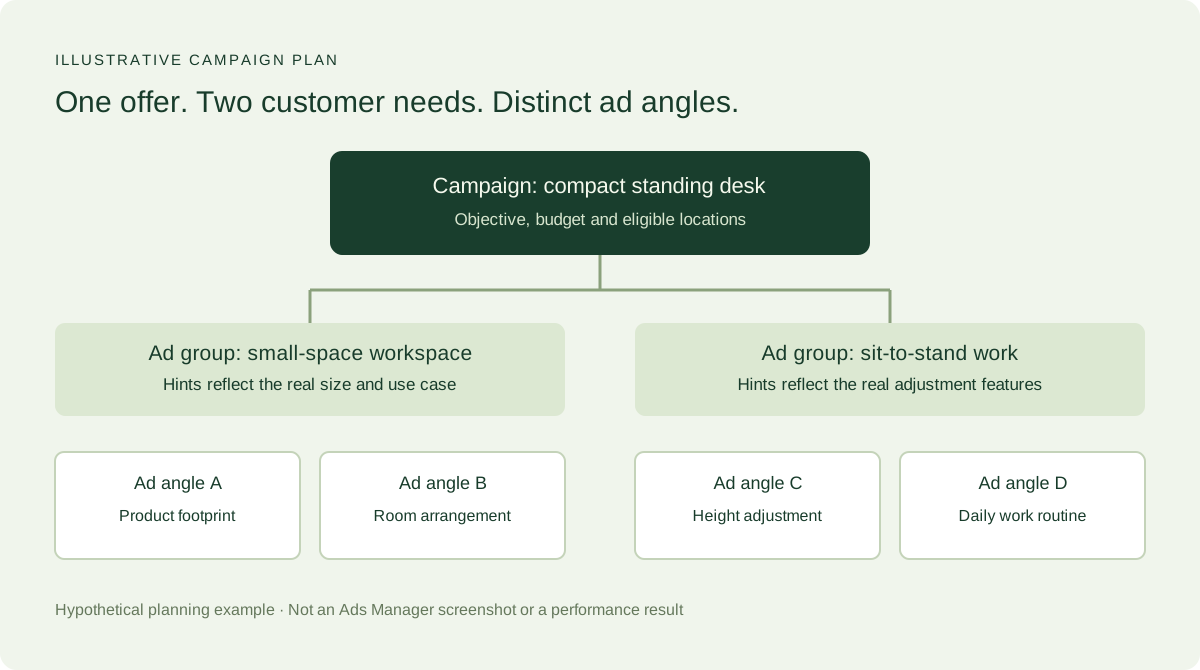
Imagine a retailer testing a compact standing desk. One ad group could address fitting a desk into a small home office; another could address changing between sitting and standing during the day. Each needs a clear promise and an appropriate destination. If both use cases lead to the same product page, make sure the page actually answers both questions.
OpenAI recommends organizing ad groups around a shared offering or customer need, separating use cases when messaging or destinations differ, and testing creative variations within a theme. Ad group guidance
This does not mean a small test needs dozens of ad groups. Each extra split creates another question your budget has to answer. Start with distinctions you can explain and act on.
4. Choose the objective, locations and spending controls
The current campaign options include Views, Clicks and Conversions. They distinguish visibility, traffic and optimization toward a supported action. Conversion optimization does not mean billing per acquired customer: supported billing options can charge for valid clicks or impressions. Check the option offered to your account. Campaign objectives
Choose the objective before creating the campaign. Ads Manager cannot change it on an existing campaign. If you want to move from a Clicks test to Conversions, create a campaign with that objective and check the event and billing settings before launch. Keep the two results separate in your reporting so the change in delivery goals is clear. Changing campaign objectives
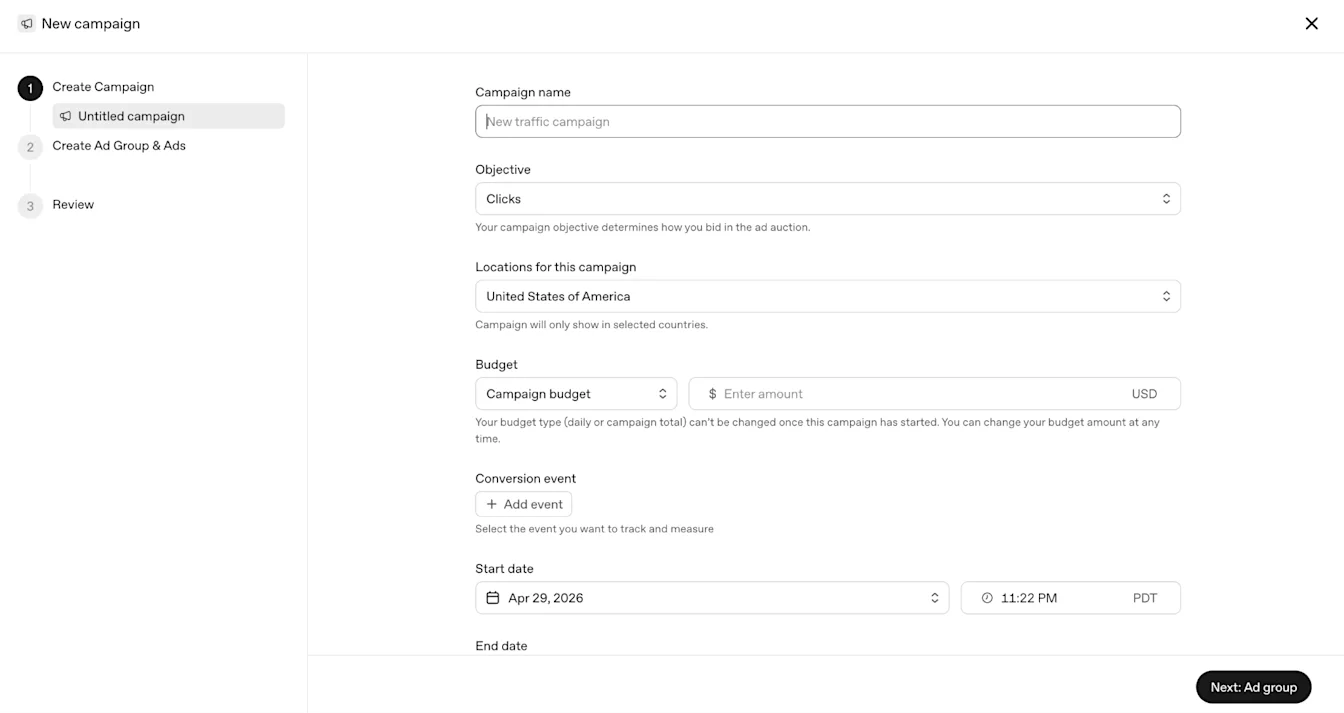
For the desk retailer, the business question might be: “Will this offer bring suitable shoppers to the product page, and do they take the next step?” That question makes the measurement discussion concrete. “We want to try AI” does not tell the operator what to optimize or the owner what to approve.
OpenAI currently lists a $25 minimum daily campaign budget for USD accounts. Minimums vary by billing currency. This is an entry setting, not a recommendation for a useful test. Minimum campaign spend
For daily-spend limits, bids, service fees and an all-in budget example, see our ChatGPT Ads cost guide. Before publication, approve the spending allowance and who can change it.
5. Write context hints that describe a real customer need
A context hint adds useful information about an offering, the people it helps or the situations where it fits. It belongs at the ad-group level. Hints inform relevance; they are not exact-match search keywords and cannot enforce location restrictions, schedules or exclusions. Context hint guidance
For our hypothetical desk, compare these approaches:
| Planning example | What the operator should notice |
|---|---|
| “desk, best desk, office desk, buy desk” | Repeats terms without explaining the customer situation |
| “A compact standing desk for apartment workers with a narrow home-office space” | Connects product, buyer and constraint, if the product genuinely fits |
| “Show this only to people in Boston” | Attempts to use a hint as a delivery restriction; use supported location controls instead |
The second example is a writing model, not a proven targeting formula. Check the product dimensions and landing page before using a claim about small spaces. An attractive hint cannot compensate for an offer that does not meet the need.
6. Make the ad and landing page tell the same story
The ad unit can include the advertiser identity, title, copy, image and destination. OpenAI’s example below illustrates how those elements fit together. Ad format
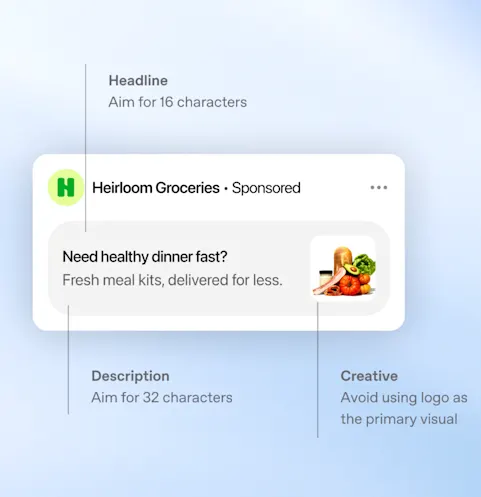
Ads Manager now offers both single-image ads and an open-beta multi-image format. Multi-image ads use 4–6 square images; each image links to the same destination URL. Confirm the format available in your account before preparing the assets. Current ad formats
Prepare distinct angles rather than near-identical sentences. For the desk example, one variation could explain how it fits a narrow workspace; another could explain the height adjustment. Link to the destination where someone can verify the specific claim, see the relevant product and take the promised next step. OpenAI’s creative guidance emphasizes clear value, complementary title and copy, relevant images and a connected landing-page experience. Creating ads
A landing page that opens on your phone can still block review crawlers. OpenAI requires access for OAI-AdsBot and recommends allowing OAI-SearchBot too. Check the relevant path, robots rules, firewall, CDN and any human-verification challenge with the person responsible for the site. Advertiser crawler guidance
Ask that person to show a successful request and readable page content. “We use a major website platform” is not evidence that this particular destination is accessible.
7. Test measurement before you buy traffic
Decide which observable action will help answer the campaign question. A product-page visit, completed enquiry and paid order are different outcomes. Do not let the available report column define success for the business.
For conversion measurement, OpenAI documents creating a data source and sending events with the OpenAI Pixel, Conversions API or both. The event must connect to the configured campaign measurement and applicable attribution rules. When both methods send the same conversion, consistent event IDs support deduplication. Conversion measurement
A useful handoff asks the implementer to demonstrate the journey: open the final destination, perform a labelled test action, confirm the intended event is received and check the campaign configuration. If the form submits but the sales team never receives the enquiry, the advertising dashboard is not the only thing that needs attention.
Keep analytics comparisons consistent. Ads clicks and analytics sessions measure different things; redirects, consent, attribution settings and time zones can affect the comparison. They should be investigated, not forced into equality. Reporting guidance
8. Review the launch settings before publication
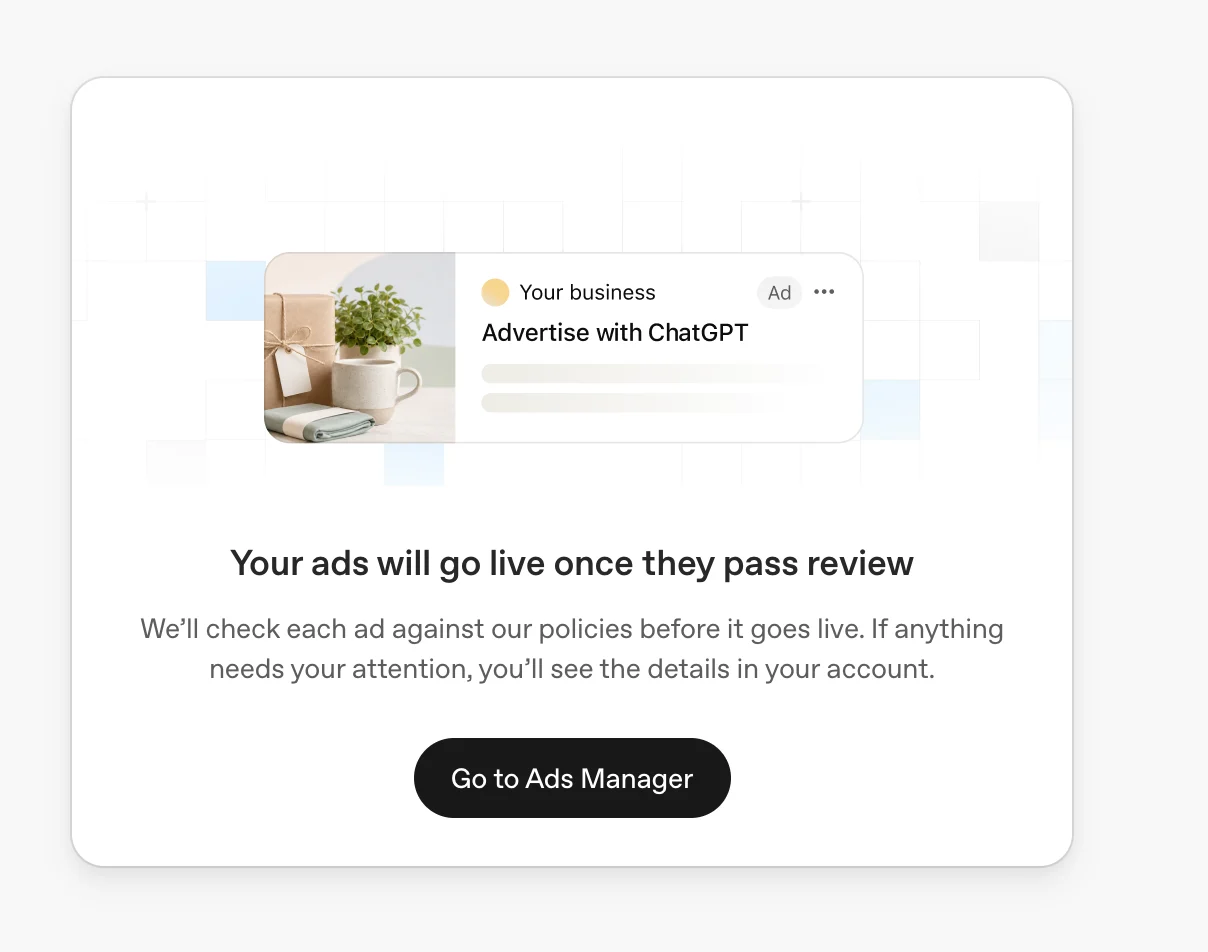
This is the easiest step to rush. OpenAI warns that the first-campaign flow may not offer start and end dates before publication. Those controls can appear when editing the campaign later or creating subsequent campaigns. Do not publish merely to unlock scheduling if you need a later start. First-campaign scheduling guidance
Put a short release sheet beside the campaign:
| Before approval | The person approving should be able to see |
|---|---|
| Correct advertiser and market | The intended account and eligible campaign locations |
| Agreed objective and budget | The selected goal, spending controls and owner |
| Connected creative | Each ad’s promise, image and final destination |
| Working measurement | The tested event and the person checking lead or order quality |
| Intended launch timing | What happens when the ads pass review |
| Decision point | When the team will review the evidence and what it needs to learn |
This is a launch-control checklist, not a promise of approval or results. If a decision is still unresolved, keep preparation separate from authorization to spend.
9. Confirm delivery, then assess the test
After approval, check actual delivery. An active campaign is not sufficient evidence that ads are being shown. Review status messages and look for impressions and clicks. If there is no delivery, inspect the reason before changing several settings at once. Launch checks
Recent reporting can be incomplete. OpenAI says impressions, clicks and CTR typically refresh around every 15 minutes, spend can lag roughly 7–8 hours, and attributed conversions can take 24–48 hours to appear. A displayed zero spend alongside recent clicks does not establish free traffic. Reporting freshness
At the first planned review, separate three questions: did the campaign deliver, did the destination receive useful actions, and did those actions meet the business definition of a worthwhile outcome? A small report with an explicit decision is more useful than a dashboard full of numbers nobody agreed to act on.
Quick questions before you start
Will paying for an ad get my brand into ChatGPT’s answers?
Ads are separate paid placements. OpenAI says advertisers cannot buy changes to the model’s answers or an endorsement. Treat advertising and organic AI visibility as different projects with different evidence. Ads and answers
Can I launch from any country if my customers are in the US?
Check the advertising entity’s country and the account’s actual delivery eligibility. A US customer base does not automatically establish self-service access for an entity elsewhere. Use the current availability list.
Should I start with bulk upload?
Guided creation and bulk upload are both documented workflows. For one small test, our practical preference is to establish a structure you can inspect first. Bulk upload adds schema validation and reconciliation work; completed processing does not establish that every row succeeded. Launch workflows
What should I bring to an agency?
Bring the offer, market, destination, spending allowance, decision-maker and measurement definition. Ask what the agency will prepare, what it needs from your team and what evidence will support the next decision. If you want help connecting those inputs, book a ChatAd planning call.
Related reading